
Bluetooth Earbuds Lagging While Gaming? Here's How to Fix It

Bluetooth earbuds lagging while gaming can cause a delay between on-screen actions and the sound you hear. This can affect mobile games where footsteps, gunshots and other audio cues matter. To fix audio delay, enable gaming mode if available, check your Bluetooth connection and make sure your phone is running the game smoothly.
If the delay continues, your earbuds may not have a low-latency mode suited to gaming. Understanding the cause first can help you decide whether a settings change will solve the problem or whether different earbuds would be more suitable.
Why Do Bluetooth Earbuds Lag While Gaming?
Bluetooth audio latency is the time it takes for sound to travel from your phone to your earbuds. Your phone processes the audio, transmits it wirelessly and your earbuds process it before playing the sound.
This delay can be particularly noticeable in fast-paced games, where sound needs to match on-screen actions.
Common causes include:
-
Bluetooth audio latency: Your earbuds take time to receive and process audio.
-
Gaming mode is disabled: Your earbuds may have a low-latency setting that is not activated.
-
Wireless interference: An unstable Bluetooth connection can cause interruptions or inconsistent playback.
-
Phone performance issues: Overheating and frame-rate drops can affect gameplay.
-
Game-specific problems: Software bugs or audio settings can cause sound to fall out of sync.
Before changing settings, check whether the problem affects one game or every app. This helps narrow down whether the issue comes from your earbuds, phone or game.
How to Fix Bluetooth Audio Delay While Gaming
Try these fixes in order. Test your audio after each step so you can identify what improves the experience.
1. Enable Gaming Mode on Your Earbuds
If your earbuds have a dedicated gaming mode, activate it before playing. This feature is designed to reduce audio latency, helping sound effects stay more closely synchronised with gameplay.
Depending on the model, you may need to activate gaming mode through touch controls, a companion app or the product instructions.
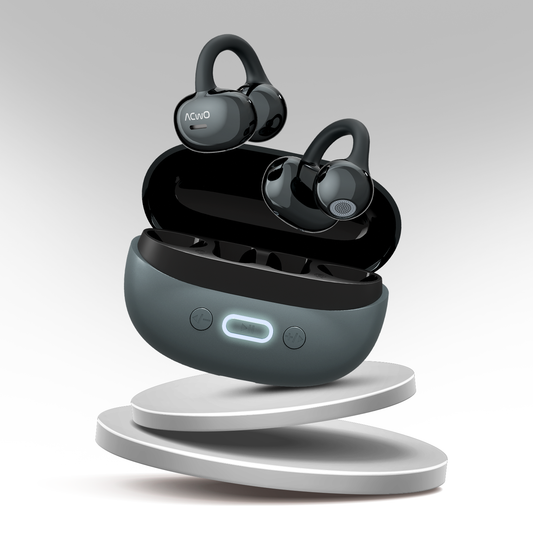
If you are considering earbuds with this feature, the ACwO DwOTS Zing Earbuds offer a claimed 40ms low-latency gaming mode. This makes them worth considering if you regularly play mobile games where audio timing matters.
2. Check Your Bluetooth Connection
Distance and wireless interference can affect connection stability. Keep your phone close to your earbuds, avoid unnecessary physical barriers and disconnect Bluetooth devices you are not using.
If the sound crackles or cuts out, disconnect and reconnect your earbuds.
Remember that an unstable connection and audio latency are not exactly the same problem. Improving connection stability may resolve interruptions, but it will not necessarily eliminate the delay associated with your earbuds' audio processing.
3. Check Whether Your Phone Is Struggling to Run the Game
If the audio delay happens alongside stuttering visuals, the problem may involve your phone's performance rather than Bluetooth alone.
Try closing unnecessary background apps, lowering the game's graphics settings and allowing your phone to cool down if it overheats.
If the visuals remain smooth but the sound arrives late, focus on your earbuds and Bluetooth settings instead.
4. Restart the Game and Reconnect Your Earbuds
Temporary software or pairing issues can sometimes affect audio playback.
Follow these steps:
-
Disconnect your earbuds through your phone's Bluetooth settings.
-
Turn Bluetooth off, wait a few seconds and turn it back on.
-
Reconnect your earbuds.
-
Restart the game and check whether the audio delay continues.
You can also test another game or video app. If the problem occurs only in one game, check for software updates or game-specific audio issues before assuming your earbuds are faulty.
5. Update Your Phone and Apps
Check for available updates for your phone's operating system, the game and your earbuds' firmware, if supported.
Updates may resolve software or connectivity issues. If the delay started after a recent update, check the manufacturer's troubleshooting guidance for known problems.
If the same issue persists across multiple apps and devices, investigate the earbuds themselves before considering a replacement.
What to Look for in Gaming Earbuds
If your current earbuds consistently produce noticeable audio delay, consider models designed for gaming. Look beyond general Bluetooth specifications and focus on features that address your actual needs.
-
Low-latency gaming mode: Designed to reduce the delay between in-game actions and audio playback.
-
Microphone quality: Important for communicating with teammates during multiplayer games.
-
Comfortable fit: Helps during longer gaming sessions.
-
Battery life: Consider how long you typically play between charges.
-
Device compatibility: Check that the earbuds work with your phone and support the features you want to use.
You can compare gaming-focused options in the ACwO gaming earbuds collection.
For example, the ACwO DwOTS Zing Earbuds feature a claimed 40ms low-latency gaming mode. The ACwO DwOTS 565 Gaming Earbuds also offer a claimed 40ms low-latency gaming feature.
Bluetooth Earbuds vs Wired Earphones for Gaming
Wired earphones avoid the Bluetooth transmission path and can offer lower audio latency, although some delay may still occur within the phone or audio hardware.
Wireless gaming earbuds provide greater freedom of movement, and models with dedicated low-latency modes can be a practical alternative to wired audio.
For casual games, regular Bluetooth earbuds may work perfectly well. For competitive games where sound timing matters, consider earbuds with a dedicated gaming mode rather than choosing based on Bluetooth version alone.
Final Thoughts
If your Bluetooth earbuds lag while gaming, start by checking gaming mode, connection stability and phone performance. Testing another game can also help you determine whether the issue comes from your earbuds or the software.
If the delay persists, consider gaming earbuds with a dedicated low-latency feature. You can compare options in the ACwO gaming earbuds collection and review individual product specifications before deciding.
The aim is to identify the source of the delay first, so you can choose a solution that actually improves your gaming experience.
Frequently Asked Questions
Enable gaming mode if your earbuds support it, disconnect and reconnect them, and restart the game. If the delay continues, test another app to determine whether the issue comes from your earbuds or the game.
Check the manufacturer's specifications for a stated latency figure or gaming mode. You can also compare audio synchronisation with your phone's speakers or another pair of earbuds, although this will not give you an exact latency measurement in milliseconds.
A claimed latency of 65ms can be suitable for many gaming situations, particularly casual mobile games. For competitive games where precise audio timing matters, lower latency may be preferable. Actual performance depends on the earbuds, phone, game and connection.
Bluetooth audio latency and internet latency are different. A fast internet connection can reduce online gaming delays, but it does not necessarily reduce the time Bluetooth earbuds take to process and play sound.
They can help reduce the delay between in-game actions and the sounds you hear. This may be useful for footsteps and gunfire in competitive games such as BGMI, although results depend on the earbuds, phone and game settings.
Not necessarily. Audio latency also depends on the supported audio codecs, processing technology and implementation of gaming mode. Check the product's latency specifications rather than choosing earbuds based on the Bluetooth version alone.